The EHR Overlay
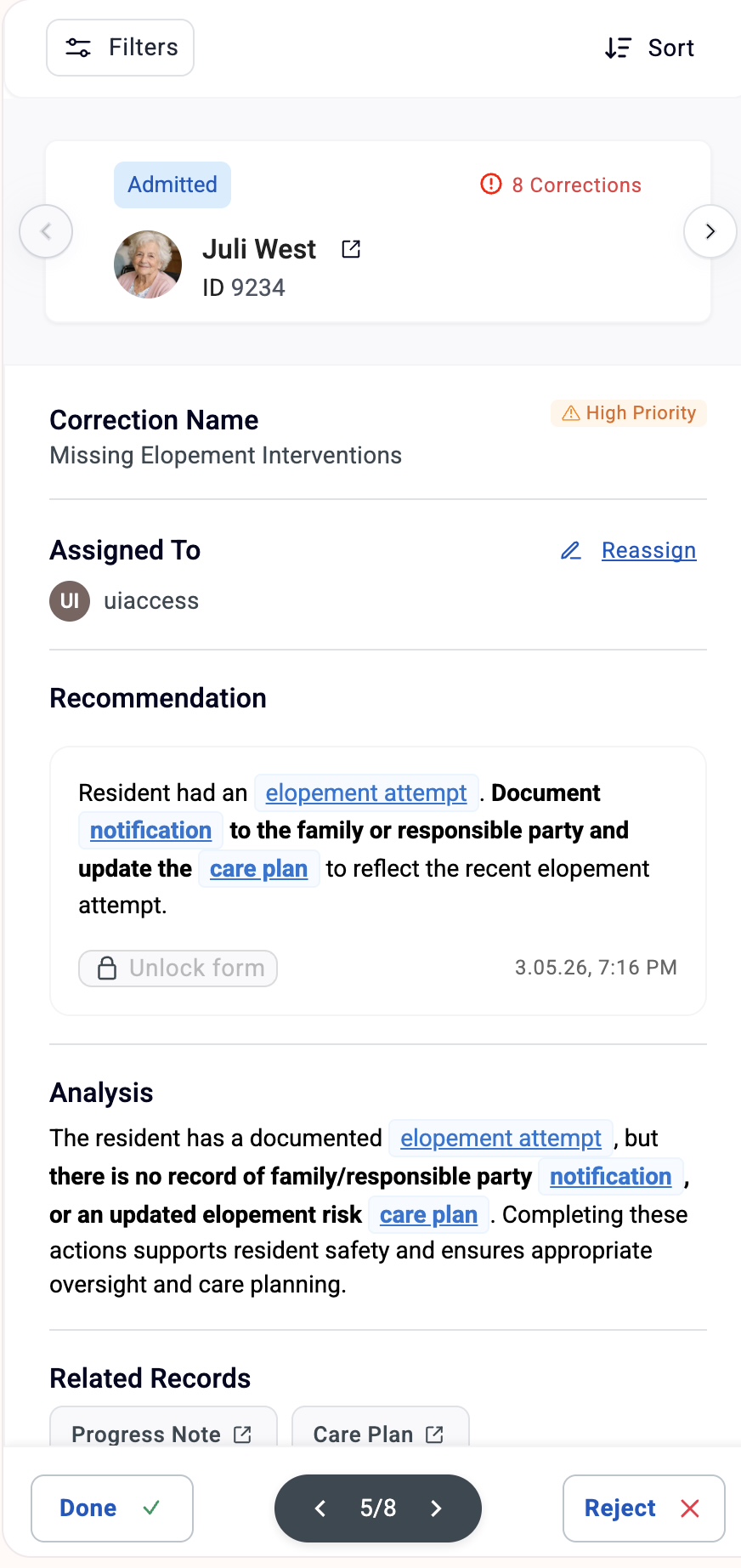
Most compliance tools live outside the EHR. Guardoc appears as a sidebar overlay directly inside your EHR - right where nurses already work.
Zero Extra Logins
Authenticates through the EHR's own OAuth. Nurses open their EHR, Guardoc is already there.
Follows the Chart
The sidebar stays visible as nurses navigate between residents, assessments, and care plans.
One-Click Fixes
Each correction deep-links to the exact EHR section. Click, fix, sign. Done.
Real-Time Sync
Done, Reject, or Reassign. Every action syncs instantly across all open tabs.
How It Works
From the moment a nurse logs into the EHR, Guardoc is already there.
- 01
Nurse opens EHR
The Guardoc sidebar loads automatically - no extra login, no app switching.
- 02
Review corrections
Patient list shows correction counts by status. Click a patient to see their specific issues.
- 03
Fix in context
Each correction includes a recommendation and a deep link to the exact EHR section that needs updating.
- 04
Mark as done
After fixing, tap Done to resolve with a timestamp, or Reject with a documented reason. Everything syncs in real time.
Troubleshooting & FAQ
Most issues can be fixed in about 5 minutes.
Questions or feedback? Reach out at support@guardoc.health
See the EHR Overlay in action
Watch how corrections flow inside your EHR in a 30-minute walkthrough.
Get a Demo